The MTK Auth Bypass Tool is a mobile servicing tool frequently encountered when working with MediaTek-powered mobile phones. Such tools are utilized when performing software-related tasks on Android devices. This specific tool was designed to resolve software issues in Android phones equipped with MTK (MediaTek) chipsets.
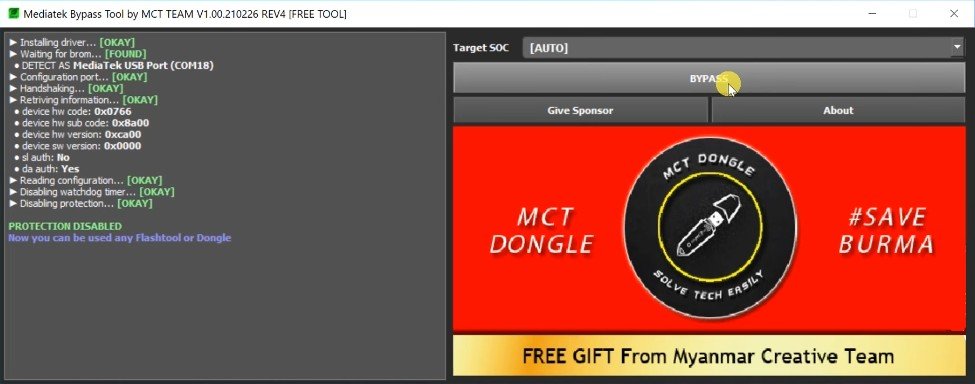
Tool Name: MCT MTK Auth Bypass Tool
Version: v2
Size: 11MB

Tool Name: MTK Auth Bypass Tool
Version: v13
Size: 20 MB

Tool Name: MTK Auth Bypass Tool
Version: v2026
Size: 36 MB
About the MTK Auth Bypass Tool
Let us understand the MTK Auth Bypass Tool in simple terms. It is a software application that can be installed on Windows laptops or PCs. Its primary purpose is to handle authentication-related hurdles that arise during the servicing process of MediaTek devices. It facilitates the connection and communication between various MediaTek mobile phones and a computer via USB.
Technicians often resort to MTK authentication bypass tools such as the MTK Auth Bypass Tool when attempts to flash the device, update firmware, or fix other software issues stall or fail to proceed.
When is this tool needed?
Software-related issues are common in Android mobile phones. For instance, a MediaTek phone might be connected to a PC, yet the servicing software fails to communicate properly with the device. Such situations can arise due to the following reasons:
- The MTK USB driver is not installed correctly.
- The device is not being detected in the correct USB mode.
- The firmware or servicing software is incompatible.
- Authentication requirements are not being met.
- The device has a unique security configuration.
- There is an issue with the USB cable or port.
- A driver conflict is occurring within Windows.
These are some of the reasons why a PC may fail to communicate effectively with the device; tools like this are used to resolve such issues.
What is MediaTek Authentication?
Android devices powered by MediaTek chipsets employ security and authentication mechanisms during low-level communication. The primary purpose of this is to ensure that sensitive operations are performed only through authorized servicing processes. This is why simply connecting an MTK device to a computer isn’t always enough; the device’s internal security configuration determines which servicing operations can proceed. Tools like the MTK Auth Bypass are used to circumvent these security restrictions.
Key Uses of the MTK Auth Bypass Tool
While these bypass tools were traditionally used by professionals, they are now seeing widespread use. The MTK Auth Bypass Tool is utilized for the following purposes:
- Facilitating communication between a MediaTek device and a PC
- Handling authentication-related servicing hurdles
- Assisting with authorized firmware servicing workflows
- Troubleshooting device communication issues
- Supporting low-level connections between the PC and the MTK device
- Device not being detected
- Frequent connect/disconnect cycles
- “Unknown USB Device” errors
- Device information not appearing in the tool
- Communication errors
Conclusion
The MTK Auth Bypass Tool is a highly popular and powerful piece of software; it is both lightweight and fast. I have personally used this tool for quite some time, and it operates very smoothly. It is most often used when standard methods fail to resolve software-related issues on a device. You have likely arrived here because you were already interested in or looking for information about this tool.
In my opinion, the MTK Auth Bypass Tool will prove to be very beneficial for you, as many of its features are free to use and will help you get the job done.